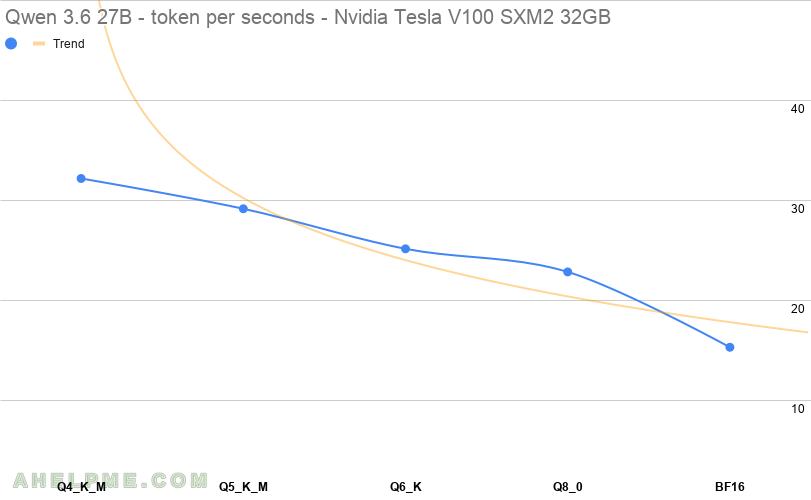
For the LLM model the Alibaba’s Qwen 3.6 27B with different quantization are used to show the difference in token generation per second and memory consumption. Qwen 3.6 27B is relatively small LLM model, but it is extremely good in general AI and software coding. The software engineers could use it not only for sophisticated auto-complete, but also for local agent coding. It is published by the Alibaba giant, and in many cases it can be considered to offload some LLM work locally for free, especially IT. The model is dense with 27B total parameters. Bare in mind, this model is relatively small compared to the bigger one – Qwen 3.5 397B A17B, which is really big LLM with 300 GiB memory for the Q4 at least, but fighting with the very expensive Claude 4.6. The Qwen 3.6 27B is light-weight and dense model, which with enough context data may result in strong agent assistant coding help in the IT. The article is focused only showing the benchmark of the LLM tokens generations per second and there are other papers on the quality of the output for the different quantized version. This model is ideal for even a single NVIDIA Tesla V100 SXM2 32GB card for local inference even with Q8 quantization – perfect for a home use. At present, this cards with Tesla V100 chip are around 400-500$. Building a low cost, but with good inference performance workstation is possible with couple of these cards. Here are the speed and the use can be expected. This article includes a BF16 (brain floating point) of the model using single NVIDIA Tesla V100 SXM2 32GB and a single NVIDIA RTX 3090 24Gb (to load the whole model in the GPU memory), all other tests are with a single card. Interesting comparison could be the NVIDIA RTX 3090 24Gb here.
The testing bench is:
- Single GPU NVIDIA Tesla V100 SXM2 32GB – 5120 shading units, 640 tensor cores.
- 32GB RAM GDDR6, with 4096 bit bus width.
- Test server – ASUS with single 1950X. Old and cheap CPU, but still good enough for a home lab.
- 1 cards with Link Speed 16GT/s, Width card with x4
- Testing with LLAMA.CPP – llama-bench
- theoretical memory bandwidth 898.0 GB/s (according to the official documents from NVIDIA)
- the context window is the default 4K of the llama-bench tool. The memory consumption could vary greatly if context window is increased.
- Price: around $450 in ebay.com (Q3 2026).
Here are the results. The first benchmark test is Q4 and is used as a baseline for the diff column below, because Q4 are really popular and they offer a good quality and really small footprint related to the full sized model version.
| N | model | parameters | quantization | memory | diff t/s % | tokens/s |
|---|---|---|---|---|---|---|
| 1 | Qwen3.6 27B | 26.90 B | Q4_K_M | 15.65 GiB | 0 | 32.152 |
| 2 | Qwen3.6 27B | 26.90 B | Q5_K_M | 18.16 GiB | 9.41 | 29.124 |
| 3 | Qwen3.6 27B | 26.90 B | Q6_K | 20.97 GiB | 13.75 | 25.118 |
| 4 | Qwen3.6 27B | 26.90 B | Q8_0 | 26.62 GiB | 9.18 | 22.81 |
| 5* | Qwen3.6 27B | 26.90 B | BF16 | 50.10 GiB | 33.03 | 15.274 |
It’s worth noting when the total output tokens increase, the tokens per second does not decrease such with the MoE models. The above table is generated using the least GPUs needed for the test, so Q4_K_M, Q5_K_M, Q6_K and Q8_0 are on a single card setup and the last one, the dual cards for the BF16. From Q4 to BF16 the decrease is 52.49%, which is absolutely usable for local AI inference and agentic work. Around 15 tokens per second is good and usable for daily use for a single user, which is what the GPU inference would offer easily.
1. Qwen 3.6 27B Q4_K_M
Using unsloth Qwen3.6-27B-Q4_K_M.gguf file.
Single NVIDIA Tesla V100 SXM2 32GB:
llama-bench --numa distribute -t 16 -p 0 -n 128,256,512,1024,2048  -m /root/models/unsloth/Qwen3.6-27B-Q4_K_M.gguf
ggml_cuda_init: found 1 CUDA devices (Total VRAM: 32494 MiB):
  Device 0: Tesla V100-SXM2-32GB, compute capability 7.0, VMM: yes, VRAM: 32494 MiB
| model                          |       size |     params | backend    | ngl |            test |                  t/s |
| ------------------------------ | ---------: | ---------: | ---------- | --: | --------------: | -------------------: |
| qwen35 27B Q4_K - Medium       |  15.65 GiB |    26.90 B | CUDA       |  -1 |           tg128 |         32.17 ± 0.05 |
| qwen35 27B Q4_K - Medium       |  15.65 GiB |    26.90 B | CUDA       |  -1 |           tg256 |         32.23 ± 0.01 |
| qwen35 27B Q4_K - Medium       |  15.65 GiB |    26.90 B | CUDA       |  -1 |           tg512 |         32.17 ± 0.01 |
| qwen35 27B Q4_K - Medium       |  15.65 GiB |    26.90 B | CUDA       |  -1 |          tg1024 |         32.09 ± 0.01 |
| qwen35 27B Q4_K - Medium       |  15.65 GiB |    26.90 B | CUDA       |  -1 |          tg2048 |         32.10 ± 0.01 |

build: 6eab47181 (9652)
So no difference, it’s 39.5~40 tokens/s.
2. Qwen 3.6 27B Q5_K_M
. Using unsloth Qwen3.6-27B-Q5_K_M.gguf file.
Single NVIDIA Tesla V100 SXM2 32GB:
llama-bench --numa distribute -t 16 -p 0 -n 128,256,512,1024,2048  -m /root/models/unsloth/Qwen3.6-27B-Q5_K_M.gguf
ggml_cuda_init: found 1 CUDA devices (Total VRAM: 32494 MiB):
  Device 0: Tesla V100-SXM2-32GB, compute capability 7.0, VMM: yes, VRAM: 32494 MiB
| model                          |       size |     params | backend    | ngl |            test |                  t/s |
| ------------------------------ | ---------: | ---------: | ---------- | --: | --------------: | -------------------: |
| qwen35 27B Q5_K - Medium       |  18.16 GiB |    26.90 B | CUDA       |  -1 |           tg128 |         29.14 ± 0.03 |
| qwen35 27B Q5_K - Medium       |  18.16 GiB |    26.90 B | CUDA       |  -1 |           tg256 |         29.18 ± 0.02 |
| qwen35 27B Q5_K - Medium       |  18.16 GiB |    26.90 B | CUDA       |  -1 |           tg512 |         29.17 ± 0.00 |
| qwen35 27B Q5_K - Medium       |  18.16 GiB |    26.90 B | CUDA       |  -1 |          tg1024 |         29.13 ± 0.01 |
| qwen35 27B Q5_K - Medium       |  18.16 GiB |    26.90 B | CUDA       |  -1 |          tg2048 |         29.00 ± 0.01 |

build: 6eab47181 (9652)
3. Qwen 3.6 27B Q6_K
Using unsloth Qwen3.6-27B-Q6_K.gguf file.
Single NVIDIA Tesla V100 SXM2 32GB:
llama-bench --numa distribute -t 16 -p 0 -n 128,256,512,1024,2048  -m /root/models/unsloth/Qwen3.6-27B-Q6_K.gguf
ggml_cuda_init: found 1 CUDA devices (Total VRAM: 32494 MiB):
  Device 0: Tesla V100-SXM2-32GB, compute capability 7.0, VMM: yes, VRAM: 32494 MiB
| model                          |       size |     params | backend    | ngl |            test |                  t/s |
| ------------------------------ | ---------: | ---------: | ---------- | --: | --------------: | -------------------: |
| qwen35 27B Q6_K                |  20.97 GiB |    26.90 B | CUDA       |  -1 |           tg128 |         25.11 ± 0.03 |
| qwen35 27B Q6_K                |  20.97 GiB |    26.90 B | CUDA       |  -1 |           tg256 |         25.15 ± 0.01 |
| qwen35 27B Q6_K                |  20.97 GiB |    26.90 B | CUDA       |  -1 |           tg512 |         25.15 ± 0.00 |
| qwen35 27B Q6_K                |  20.97 GiB |    26.90 B | CUDA       |  -1 |          tg1024 |         25.12 ± 0.00 |
| qwen35 27B Q6_K                |  20.97 GiB |    26.90 B | CUDA       |  -1 |          tg2048 |         25.06 ± 0.00 |

build: 6eab47181 (9652)
4. Qwen 3.6 27B Q8_0
Using unsloth Qwen3.6-27B-Q8_0.gguf file.
Single NVIDIA Tesla V100 SXM2 32GB:
llama-bench --numa distribute -t 16 -p 0 -n 128,256,512,1024,2048  -m /root/models/unsloth/Qwen3.6-27B-Q8_0.gguf
ggml_cuda_init: found 1 CUDA devices (Total VRAM: 32494 MiB):
  Device 0: Tesla V100-SXM2-32GB, compute capability 7.0, VMM: yes, VRAM: 32494 MiB
| model                          |       size |     params | backend    | ngl |            test |                  t/s |
| ------------------------------ | ---------: | ---------: | ---------- | --: | --------------: | -------------------: |
| qwen35 27B Q8_0                |  26.62 GiB |    26.90 B | CUDA       |  -1 |           tg128 |         22.80 ± 0.02 |
| qwen35 27B Q8_0                |  26.62 GiB |    26.90 B | CUDA       |  -1 |           tg256 |         22.82 ± 0.01 |
| qwen35 27B Q8_0                |  26.62 GiB |    26.90 B | CUDA       |  -1 |           tg512 |         22.81 ± 0.01 |
| qwen35 27B Q8_0                |  26.62 GiB |    26.90 B | CUDA       |  -1 |          tg1024 |         22.80 ± 0.00 |
| qwen35 27B Q8_0                |  26.62 GiB |    26.90 B | CUDA       |  -1 |          tg2048 |         22.82 ± 0.00 |

build: 6eab47181 (9652)
5. Qwen 3.6 27B BF16
Using unsloth Qwen3.6-27B-BF16-00001-of-00002.gguf and Qwen3.6-27B-BF16-00001-of-00002.gguf files.
Single NVIDIA Tesla V100 SXM2 32GB and single NVIDIA RTX 3090:
llama-bench --numa distribute -t 16 -p 0 -n 128,256,512,1024,2048  -m /root/models/unsloth/Qwen3.6-27B-BF16-00001-of-00002.gguf
ggml_cuda_init: found 2 CUDA devices (Total VRAM: 56616 MiB):
  Device 0: NVIDIA GeForce RTX 3090, compute capability 8.6, VMM: yes, VRAM: 24122 MiB
  Device 1: Tesla V100-SXM2-32GB, compute capability 7.0, VMM: yes, VRAM: 32494 MiB
| model                          |       size |     params | backend    | ngl |            test |                  t/s |
| ------------------------------ | ---------: | ---------: | ---------- | --: | --------------: | -------------------: |
| qwen35 27B BF16                |  50.10 GiB |    26.90 B | CUDA       |  -1 |           tg128 |         15.27 ± 0.01 |
| qwen35 27B BF16                |  50.10 GiB |    26.90 B | CUDA       |  -1 |           tg256 |         15.28 ± 0.00 |
| qwen35 27B BF16                |  50.10 GiB |    26.90 B | CUDA       |  -1 |           tg512 |         15.28 ± 0.00 |
| qwen35 27B BF16                |  50.10 GiB |    26.90 B | CUDA       |  -1 |          tg1024 |         15.28 ± 0.00 |
| qwen35 27B BF16                |  50.10 GiB |    26.90 B | CUDA       |  -1 |          tg2048 |         15.26 ± 0.00 |

build: 6eab47181 (9652)
Bear in mind that there is an additional latency because of the data transfer between the two/three cards using the PCI-E. Running BF16 is only possible with two cards with 32Gb RAM, but only one is available, so the second card is NVIDIA RTX 3090, which is faster than the NVIDIA Tesla V100 SXM2 32GB (llama-bench the Qwen3.6 27B and NVIDIA RTX 3090). Here, the results are really surprising, because no decrease of token generation is reported despite the slower card NVIDIA Tesla V100 SXM2 32GB is doing the 60% of the work. As seen in the link above, the benchmark tests with dial NVIDIA RTX 3090 yields 15 token generations per seconds, too.
nvidia-smi
Mon Aug 10 14:51:46 2026
+-----------------------------------------------------------------------------------------+
| NVIDIA-SMI 580.126.09             Driver Version: 580.126.09     CUDA Version: 13.0     |
+-----------------------------------------+------------------------+----------------------+
| GPU  Name                 Persistence-M | Bus-Id          Disp.A | Volatile Uncorr. ECC |
| Fan  Temp   Perf          Pwr:Usage/Cap |           Memory-Usage | GPU-Util  Compute M. |
|                                         |                        |               MIG M. |
|=========================================+========================+======================|
|   0  Tesla V100-SXM2-32GB           Off |   00000000:07:00.0 Off |                    0 |
| N/A   48C    P0            187W /  300W |   29581MiB /  32768MiB |     59%      Default |
|                                         |                        |                  N/A |
+-----------------------------------------+------------------------+----------------------+
|   1  NVIDIA GeForce RTX 3090        Off |   00000000:0A:00.0 Off |                  N/A |
| 30%   51C    P0            109W /  350W |       0MiB /  24576MiB |      0%      Default |
|                                         |                        |                  N/A |
+-----------------------------------------+------------------------+----------------------+
|   2  NVIDIA GeForce RTX 3090        Off |   00000000:42:00.0 Off |                  N/A |
| 74%   76C    P2            249W /  420W |   20891MiB /  24576MiB |     36%      Default |
|                                         |                        |                  N/A |
+-----------------------------------------+------------------------+----------------------+
Before all tests the cleaning cache commands were executed:
echo 0 > /proc/sys/kernel/numa_balancing
echo 3 > /proc/sys/vm/drop_caches
For more LLM performance benchmarks with llama-bench check out – here.